 Help Center
Run Mandel’s h and k statistics to detect outliers
This tutorial will help you compute and interpret Mandel’s h and k statistics for outliers in Excel using XLSTAT.
Dataset for testing differences between samples with Mandel's statistics
Four samples have been obtained from two different distributions: 3 from a normal distribution with mean 0 and variance 2 and one from a normal distribution with mean 0 and variance 5 .We suppose that each sample is related to the results of a laboratory. We wish to test if there are differences between laboratories' results.
Goal of this tutorial
We would like to detect if means and variances are homogeneous using the h and k statistics of Mandel.
Setting up a h and k Mandel's statistics analysis
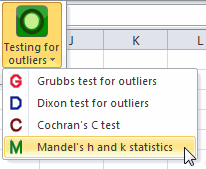
To start the Mandel's h and k statistics go to the menu Testing outliers / Mandel's h and k statistcs.
In the General tab, select the data. Four columns should be selected with the option one column per group.
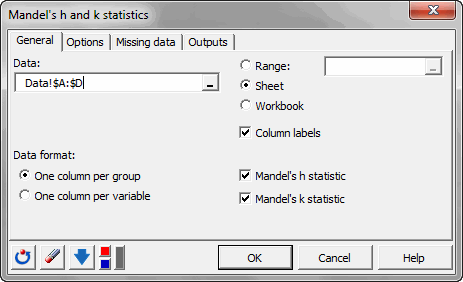
When ready click on OK.
Results of a h and k Mandel's statistics
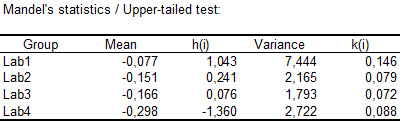
In the following table, we can see the h and k statistics for each laboratory.
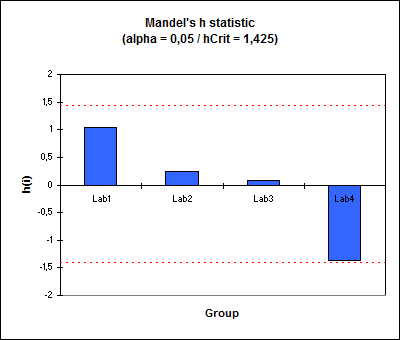
In the following graphic, the h statistics are displayed together with the critical value. We can see that none of the values are outside the critical interval.
The same graphic is available for the k statistic. It also shows that none of the laboratory obtain an outlying k statistic.
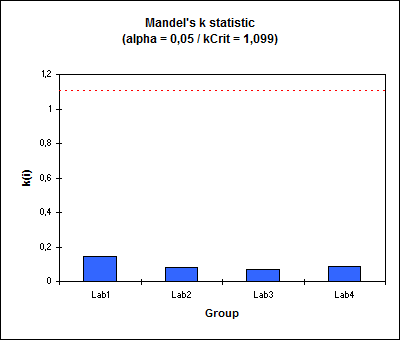
We have shown that there is no outlying laboratory in this study.
Was this article useful?
- Yes
- No
