 Help Center
Rank-based regression in Excel
This tutorial shows how to run a rank-based regression in Excel using the XLSTAT-R engine.
What is rank-based regression?
Rank-based regression allows estimating rank-based coefficients for linear models. Those estimations are considered to be more robust with regards to outliers compared to more classical estimation approaches. The Rank-based regression function developed in XLSTAT-R calls the rfit function from the Rfit package in R (John Kloke).
Data set for launching a rank-based regression in XLSTAT-R
The data corresponds to the data used in the XLSTAT ANCOVA tutorial: Download the data## Setting up a rank-based regression in XLSTAT-R
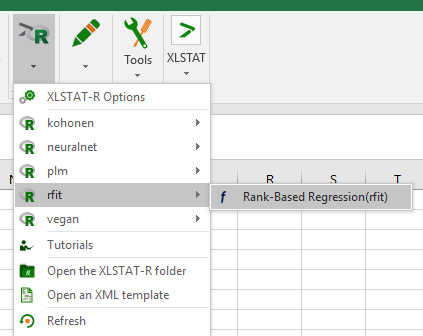
Open R / Rfit / Rank-Based Regression
Fill in the general tab as follows:
Fill in the general tab as follows:
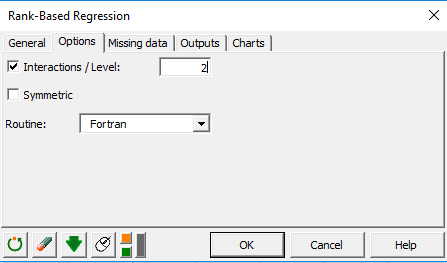
 Activate the Interactions option in the Options tab.
 Click OK.
In the dialog box that appears, select the terms you want to include in the model:
Click OK.
In the dialog box that appears, select the terms you want to include in the model:
 Select the terms you want to keep and click OK.
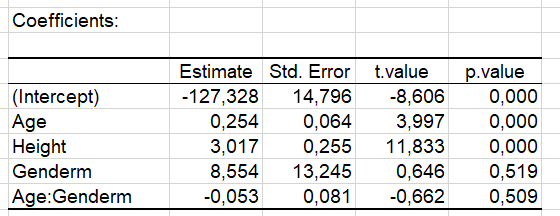
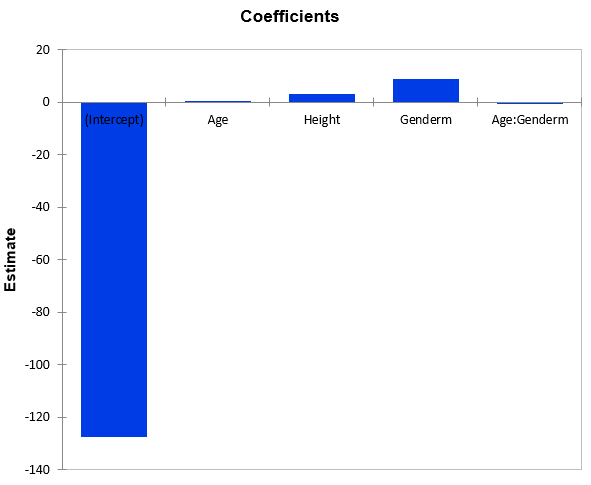
Interpret the results.
Select the terms you want to keep and click OK.
Interpret the results.
Was this article useful?
- Yes
- No
